LEB2 Support Help Center home page
  • ไทย
  • Sign In
  • Community
  • Submit a request

Search

  1. LEB2 Support
  2. Student's Guide
  3. Using LEB2

Learning Activity

  • Updated July 10, 2020 05:19

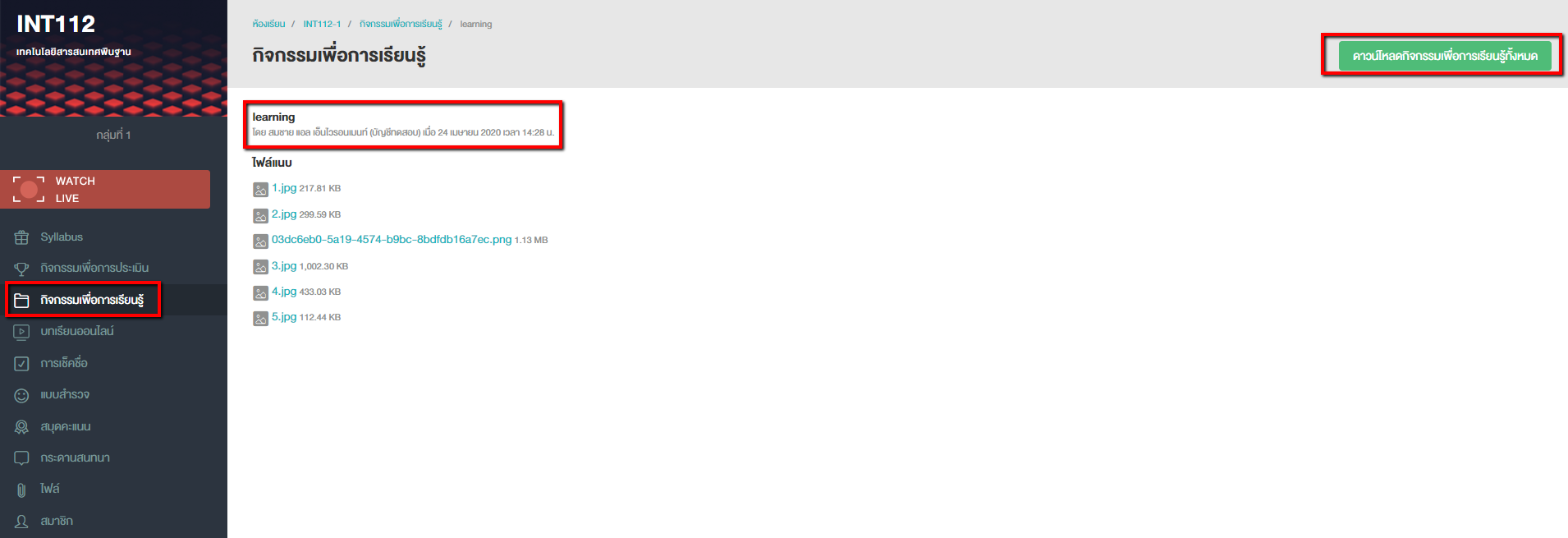
Learning Activity is to activity that you can download all files or watch video immediately in the class.

  1. Go to Learning Activity feature
  2. Select the activity as required
  3. Select file or video as required. You can watch videos on LEB2 without downloading.
 

_____________.png

Was this article helpful?

13 out of 25 found this helpful

Related articles

  • Attendance Check-in Guide (for Students)
  • Learn it, your online lesson!
  • Self-assessment through Score Book Feature
  • Student Guide to LEB2
  • The difference between Assessment Activity and Learning Activity

Articles in this section

  • Getting Started Guide for LEB2 for FIBO Academy Program Participants
  • Access LEB2 through mobile phone
  • Access Syllabus on Mobile Version
  • OBEM Classroom for Students
  • Syllabus components should the students know
  • Self-assessment through Score Book Feature
  • Student Guide to LEB2
  • Submit The Assignment and Check The Status on LEB2
  • Learn it, your online lesson!
  • Learning Activity

See more

LEB2 Support
  • About us
  • Jobs
  • Fast track tutorials
Contact
  • Facebook: KMUTT learning environment - LEB2
  • E-mail: leb2@mail.kmutt.ac.th
  • Zendesk Theme by Zenplates eiei
Powered by Zendesk